Native 4k Vs Upscaled 4k Gaming Explained | 10 Critical Differences
Picking between native and upscaled 4K comes down to knowing what your graphics card is really doing and what matters most to you in gaming. With native 4K, your GPU draws every pixel about 8.3 million of them fresh for each frame.
Upscaled 4K starts at a lower resolution, then uses smart software to guess and add the missing pixels, giving you something close to real 4K without the heavy workload. Knowing this difference can help you set up your system in a way that fits your needs better.
Pixel Rendering
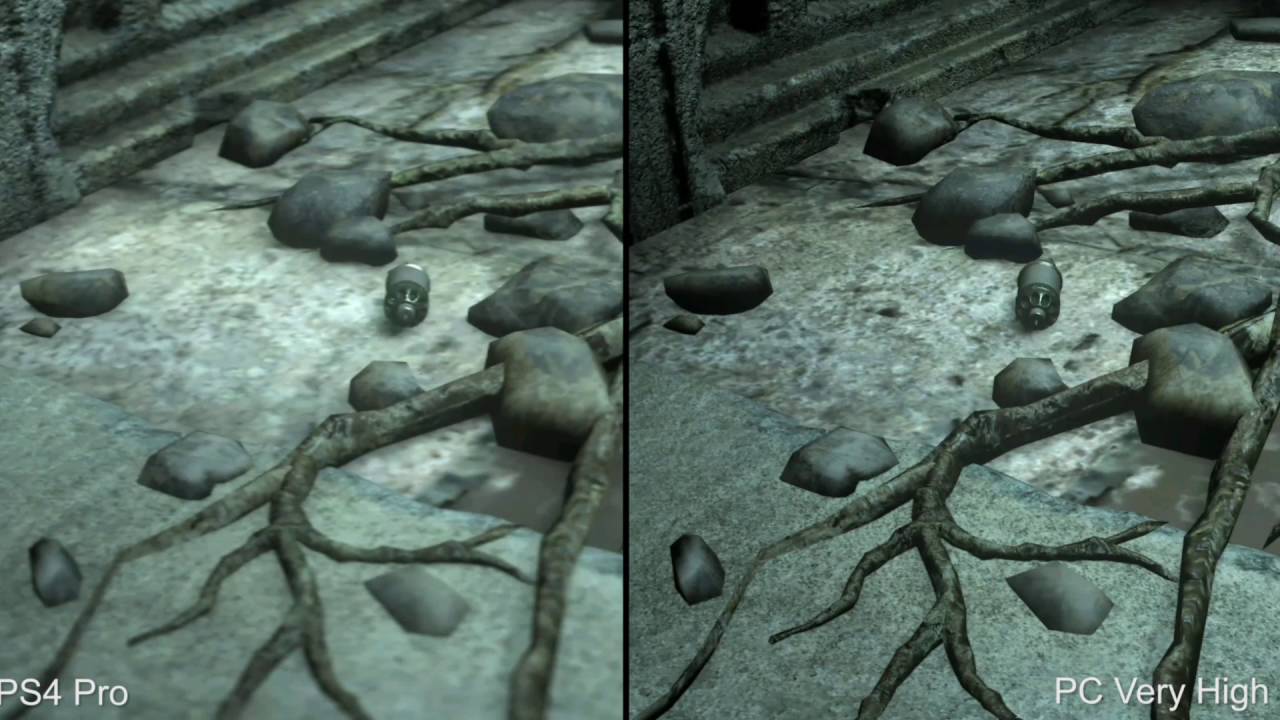
PS4 Pro upscaled 4k VS PC native 4k comparison on Rise Of The Tomb Raider
The biggest difference comes down to how each pixel on your screen is created. With native 4K, your graphics card draws every single one of the 8.3 million pixels at full resolution 3840 by 2160. It calculates the color, lighting and texture for each pixel from scratch.
Upscaled 4K works differently. Instead of drawing all those pixels, the GPU renders the image at a lower resolution like 1080p or 1440p and then fills in the missing detail using smart software. It’s predicting what the extra pixels should look like based on patterns it’s learned.
Today’s best upscaling tools, like DLSS, use AI trained on tons of high-res images to make those predictions. The result can look surprisingly close to native 4K, sometimes even sharper, depending on the game and settings.
The Frame Rate Reality
Running games at native 4K puts serious pressure on your graphics card. Because it’s handling so many pixels, frame rates often drop sharply, even top-tier GPUs can fall below 60 frames per second in demanding games.
Upscaling changes that. By rendering fewer pixels and then smartly expanding the image, your GPU can run much faster. In many cases, you’ll see frame rates jump by 50% or more compared to native 4K. This makes upscaling one of the most effective methods for increasing FPSwithout heavily sacrificing visual quality.
For example, a game that runs at 55 FPS in native 4K might hit 130 FPS with DLSS in Quality mode. Fewer pixels to draw means your system can focus its power where it counts, then use efficient methods to fill out the rest. For fast-paced games, that extra speed can make a real difference.
Visual Clarity
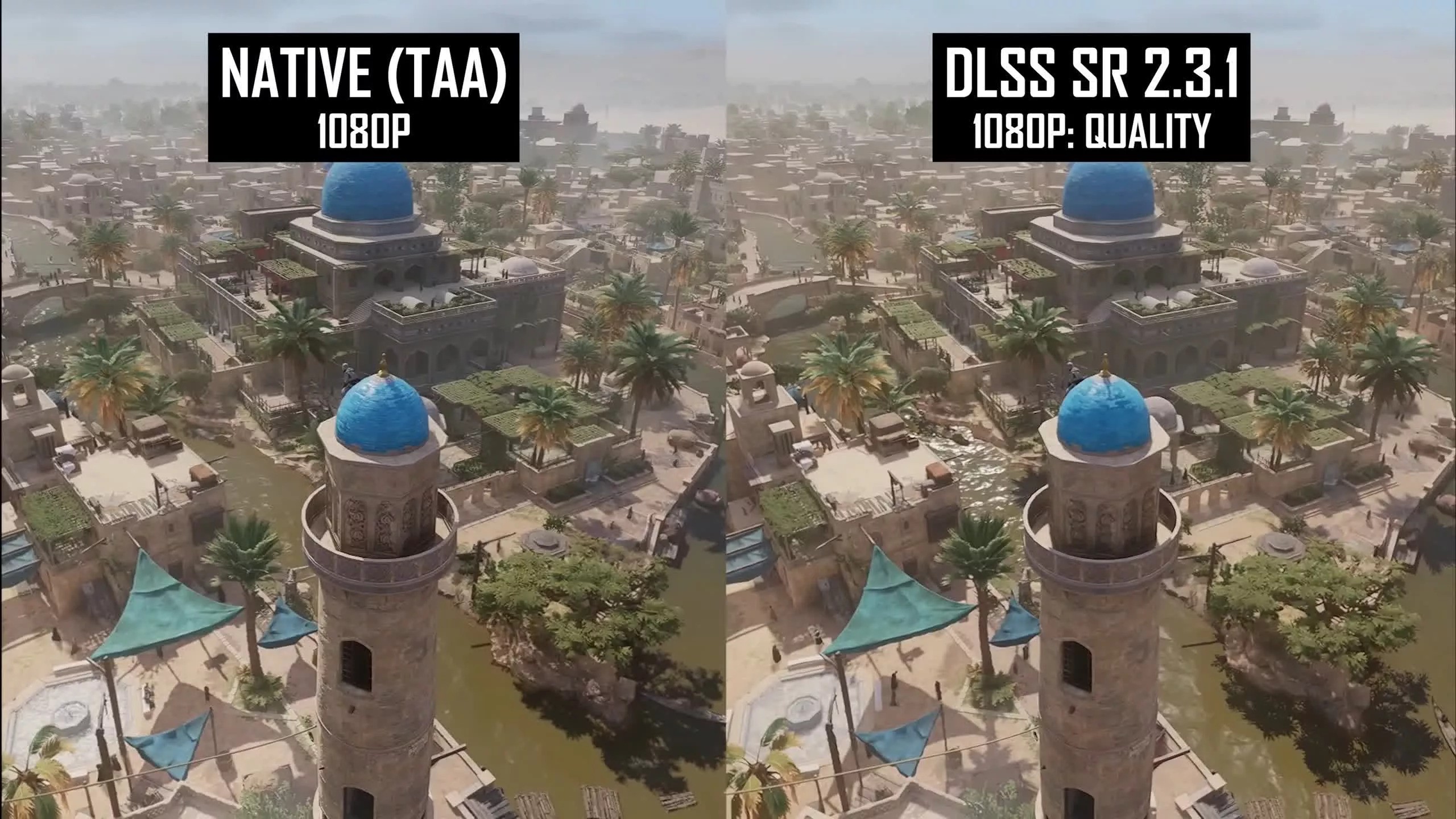
Native 4K gives you the most accurate detail because every pixel is fully rendered. Textures, distant objects and fine elements all look their best. Upscaling can’t invent detail that wasn’t there to begin with, so in theory, native always wins on clarity.
Some upscaling methods, especially DLSS 4, can produce images that look crisper than native 4K in certain situations. That’s because they handle edges and motion better than traditional anti-aliasing, which can leave things looking a bit soft or blurry.
The visual difference depends heavily on the upscaling technology used:
- Simple upscaling - Noticeably softer, blurrier image with visible artifacts
- Checkerboard rendering - Decent quality but can show geometric artifacts during motion
- DLSS/FSR Quality modes -Often usable at 4K with minimal quality loss, particularly in Quality or Balanced presets
- DLSS Performance mode -Faster but introduces more visible compromises
Motion Handling
How a game handles motion shows the real difference between rendering methods. Native 4K keeps things sharp and steady during fast action because every frame is drawn at full resolution from scratch. Quick camera turns, fast-moving characters or big explosions stay clean, there’s no guesswork or reused data from earlier frames.
Upscaled 4K, especially older techniques that borrow details from past frames, can struggle here. Sudden motion might cause ghosting, blurry trails or flickering. Early checkerboard rendering, for example, often broke down when the camera swept quickly over detailed surfaces.
Today’s AI upscaling fixes most of these problems. Tools like DLSS and FSR use motion vectors information tracking how objects move to place details accurately in each new frame. The result is smooth, stable visuals that often look as good as native 4K.
Hardware Requirements
7900 XTX vs RTX 4080, 20 Games at 4K, 1440p & 1080p
Your choice of rendering method changes what kind of hardware you need. Running native 4K takes serious power. You’ll need a high-end graphics card like an RTX 4080, RTX 4090 or RX 7900 XTX.
Even then, some newer games might force you to lower settings to keep frame rates smooth. Mid-range or budget cards usually can’t handle native 4K without major quality cuts. Upscaled 4K opens the door for more people.
Cards like the RTX 4060 Ti or RX 7700 XT can deliver great-looking 4K using DLSS or FSR. For example, 4K with DLSS Balanced often runs as fast as native 1440p but with better image quality, making high-res gaming possible on more affordable setups. This balance is exactly what you’d expect from the cheapest 4K gaming setup, where smart tech helps deliver strong visuals without high-end costs. Console players see this balance every day.
Read Also: Best Budget 4k Camera For Filmmaking
Technology Types
Basic Upscaling
This is what your TV or monitor does by default when you play a lower-resolution game. It uses simple math to stretch the image, but the result is soft and lacks detail. You’ll see this if you run a 1080p game on a 4K screen without any special upscaling turned on.
Checkerboard Rendering
This technique renders only half the pixels in a checkerboard pattern, then fills in the gaps using smart filtering. The PS4 Pro made this popular. Quality depends on the game, but it’s usually better than basic upscaling and not quite as good as modern AI methods.
Temporal Reconstruction
This approach combines data from several frames and uses motion info to build a sharper final image. It’s more advanced than checkerboarding and forms the base for today’s best upscaling technology.
AI-Powered Upscaling
DLSS (NVIDIA), FSR (AMD) and XeSS (Intel) are the top choices right now. DLSS typically gives the cleanest image and biggest performance boost but only works on RTX cards. FSR runs on almost any modern GPU and still delivers strong results. Both can produce visuals that rival or even match native 4K in many situations.
Screen Size And Distance

On smaller screens like 24 to 27 inches sitting at a normal desk distance, you won’t notice much difference between true 4K and a well-upscaled image. The pixels are already packed tightly enough that your eyes can’t pick out the gaps, so any small quality loss from upscaling just isn’t visible.
Bigger screens, starting around 32 inches or more or sitting closer, make those differences clearer. True 4K shines here with sharper text, cleaner menus and better detail on faraway objects. That said, upscaling still does a solid job at 4K because the extra data helps the algorithm produce a cleaner image.
If you’re gaming on a large TV like 55 inches or bigger from your couch about 8 to 10 feet away, even heavy upscaling looks good. The smoother performance you get from it usually matters more than tiny clarity losses.
Game Type Matters
In fast-paced multiplayer shooters like CS2, Valorant or Apex Legends, high frame rates matter more than perfect visuals. Upscaled 4K gives you a real edge here100+ frames per second means smoother aiming, less delay and clearer motion during fast action.
For story-driven games like Cyberpunk 2077, The Last of Us or Red Dead Redemption 2, native 4K adds a lot. These games are built to look good and if your system can hold 45 to 60 frames per second at full 4K, the experience feels rich and cinematic.
Action-heavy titles like DOOM Eternal or Devil May Cry 5 feel best with high frame rates. Jumping from 60 to 120 FPS changes how responsive and fluid the game feels, so upscaled 4K with unlocked frame rates is the better pick.
Input Lag And Response
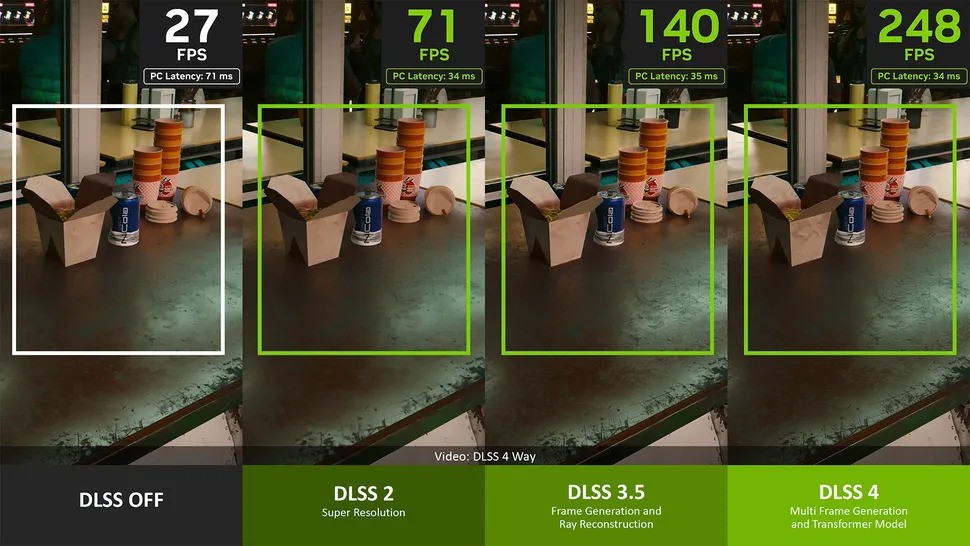
Native 4K takes more time to render each frame, which adds input lag. At 45 FPS, each frame takes about 22 milliseconds before it even reaches your screen. Upscaled 4K runs at higher frame rates, which cuts that delay.
At 90 FPS, each frame takes only about 11 milliseconds, almost half the wait. With HDMI 2.1 and a 120Hz display, you also get smoother motion and less screen tearing, making everything feel snappier. Pair that with adaptive sync tech like G-SYNC or FreeSync and you get tear-free gameplay without the lag that old-school V-SYNC causes.
What’s Coming Next
Native 4K is still the gold standard for image quality. But it’s becoming less practical unless you’ve got top-tier gear. Graphics cards now are built to run games with upscaling turned on, not to max out native 4K.
The latest versions of DLSS and FSR have gotten much better. FSR 4, in particular, is closing the gap with DLSS in both quality and performance. Frame generation, where the system creates extra frames using AI is the next big step.
It can double your frame rate, though it adds a bit of delay. When combined with strong upscaling, it’s making 4K at 120 FPS possible even on mid-range setups. Get hardware that handles upscaling well.
You’ll always have native 4K as an option, but having good upscaling gives you the freedom to pick speed or sharpness depending on the game.
FAQs About Native 4K Vs Upscaled 4K Gaming
Is Upscaled 4K Really Worth It Compared To Native?
If you’re using modern upscaling like DLSS or FSR. You get a big boost in frame rates often 50% to 100% more while still keeping image quality very close to native 4K, especially in “Quality” mode.
Can You Tell The Difference Between Native And Upscaled 4K?
With good upscaling like DLSS Quality mode on a standard gaming monitor, the difference is hard to spot unless you pause and zoom in on fine details or distant textures.
Does Upscaled 4K Look Better Than Native 1440p?
When you run upscaled 4K on a 4K screen, it often looks sharper and cleaner than native 1440p. That’s because the upscaling tech has more pixels to work with and uses smart tricks to rebuild detail.
What Hardware Do I Need For Native 4K Gaming?
To play modern games at native 4K with high settings and smooth frame rates, 60+ FPS, you’ll need a powerful GPU like an NVIDIA RTX 4070 Ti or better or an AMD RX 7900 XT or higher.
Should I Use DLSS Or FSR For Upscaled 4K?
If you have an NVIDIA RTX graphics card, go with DLSS, it generally gives the best image quality and detail. FSR works on almost any GPU (including AMD, Intel and older NVIDIA cards and has gotten much better with FSR 3 and 4.
Why Do Console Games Use Upscaling Instead Of Native 4K?
Consoles have fixed hardware, so developers have to make smart trade-offs. Upscaling lets games on the PS5 or Xbox Series X hit 4K resolution while still running at 60 or even 120 frames per second.
Final Thoughts
Go with native 4K if your system is powerful enough to keep frame rates above 60, you’re into story-driven games where visuals really shine and you care more about the sharpest possible image than raw speed. It’s still the top option for pure picture quality.
Pick upscaled 4K if you want a smart mix of looks and performance. especially in fast or competitive games where smooth frame rates matter more. If your graphics card sits in the mid to high-mid range, modern upscaling like DLSS or FSR gives you nearly the same clarity as native 4K but with much better performance.